documentation
What the chip supports, in one table.
Every peripheral below runs against the same native Rust model whether you use the ESP32 dev module or the ESP32-CAM — the modules differ only in memory, pins, and the camera. Status reflects the verified worker test-suite, not aspirations.
Peripheral support matrix
ESP32 silicon vs ESP32-CAM module. “Demo” jumps back to the console with that firmware selected.
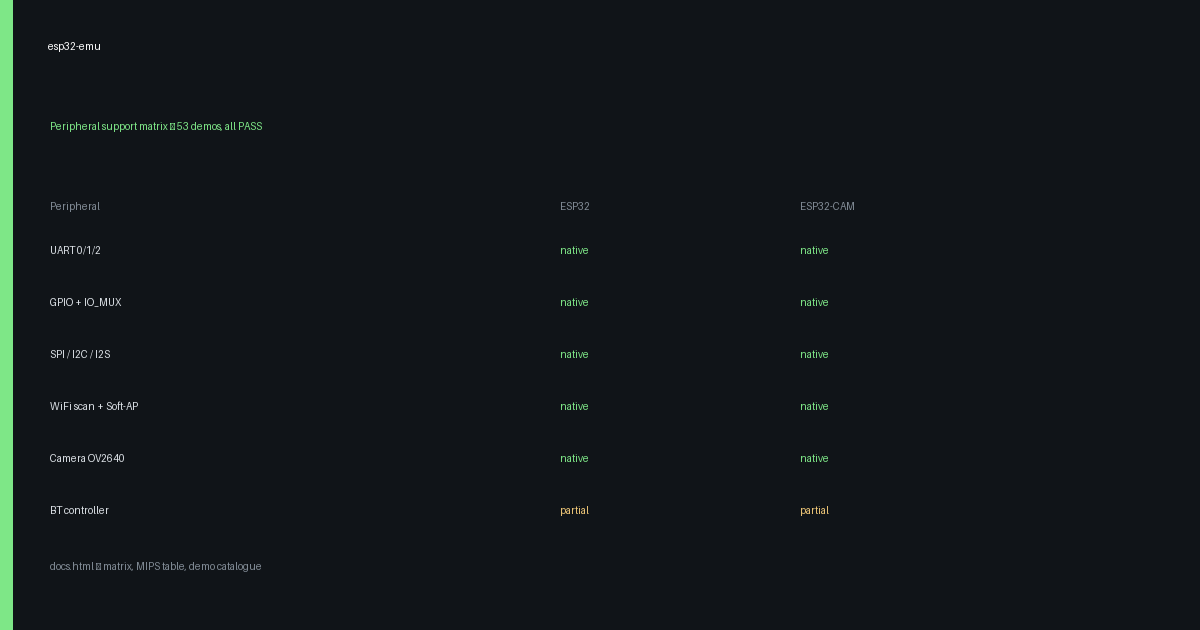
| Peripheral | ESP32 | ESP32-CAM | What was added | What is left | Demo |
|---|
native cycle-counted Rust model, test passing partial works with documented limits not emulated out of scope for this engine
Module comparison
| Item | ESP32 dev module | ESP32-CAM (AI-Thinker) |
|---|---|---|
| Silicon | ESP32, dual LX6 @ 240 MHz model | Same ESP32 silicon |
| Flash | 4 MB | 4 MB |
| PSRAM | Optional | 4 MB quad, on by preset (psramFound() true) |
| Camera | — | OV2640 via SCCB + I2S-camera DMA, 160×120 test frame (38400 B) |
| Pins | Free GPIO | Fixed camera pinout (PWDN 32, XCLK 0, SIOD 26, SIOC 27, D0–D7, VSYNC 25, HREF 23, PCLK 22), LED 33, flash LED 4 |
| Demo toggle | Default board | Use the ESP32-CAM button above the console; any demo runs on either |
WiFi station + AP
Station scan/associate and Soft-AP init run fully offline in the emulator. The data path (DHCP, DNS, TCP/UDP, port-forward to the board) flows through the local gateway over a WebSocket — the same path the Node test-suite uses.
Station (STA)
Scan finds the virtual AP, auth + assoc complete, DHCP assigns an address. Try the WiFi scan demo, then pick STA only vs STA + AP in the console WiFi panel.
Access point (AP)
Soft-AP init, softAPIP() = 192.168.4.1, derived MAC, station count. Try the Soft-AP demo. Association counting needs a second station — untested, count stays 0.
OTA + partition presets
The console OTA preset selector rewrites the partition table before boot — the same CSV path the worker tests use.
| Preset | Table | Used by |
|---|---|---|
| OTA | nvs + otadata + ota_0/1 + spiffs | OTA update |
| OTA minimal | nvs + otadata + ota_0/1 | OTA slots |
| Factory default | Firmware-baked table | Default part. |
Per-demo speed (true MIPS)
Retired instructions / wall-clock to the pass mark, measured host-side on the same engine the page runs (Rust inst_count summed over both cores — instructions the WASM cores really executed, not the JS step budget). Real firmware, all 53 PASS. The console prints the live figure after every run; expect ~9–26 MIPS depending on workload.
| Demo | MIPS | Retired instr | Wall | Demo |
|---|
References
Prior art this project learns from — JS-first chip simulation with real firmware images.
wokwi / esp8266js
ESP8266 simulator in JavaScript (MIT, Uri Shaked). Boots real bootloader + partition + app binaries from an RTOS-SDK build — the same “real image in, UART out” contract our console follows. github.com/wokwi/esp8266js
wokwi / esp32js
Wokwi’s ESP32 simulator core. Useful as a second opinion on peripheral semantics (timers, SPI flash cache, WiFi frame flow) when our native Rust models disagree with observed firmware behavior. github.com/wokwi/esp32js
Demo catalogue
All 53 images are prebuilt Arduino firmware (bootloader + partitions + app), verified PASS on the host suite before shipping. Seven need a host action while they run — the console performs it for you; UART echo is fully interactive (you type, the chip echoes).
| Demo | Exercises | Pass mark | Host assist |
|---|
Build, test, reproduce
Rebuild the engine
npm run build:wasm   # Rust → WASM
npm run build        # esbuild dist/ bundle
npm test             # no-server battery
Run the peripheral suite
node tests/compile-server.mjs  # :5525
node tests/test-worker-gpio.mjs
./tests/run-worker-tests.sh --skip-bt --skip-wifi